
Automate processes, reduce errors, and save time with our SAP BTP-based FIORI application.
Executive Summary
The MigraTEQ FIORI application, part of the TransTEQ suite, provides an easy-to-use and comprehensive solution for collecting user data during SAP system migrations. It simplifies gathering key information — such as roles, job functions, authorizations, and access settings —while carefully following the SAP Clean Core approach by development on SAP Business Technology Platform. By reducing technical mistakes and automating final migration tasks, MigraTEQ helps save time and money, increasing both efficiency and precision.

Solution and Business Value
- SAP system migrations and large deployments demand precise gathering and transfer of user master data, roles, and authorizations.
- This process is typically complex, error-prone, and time-consuming, necessitating advanced expertise in SAP module access management.
- MigraTEQ simplifies technical complexity with an intuitive, user-friendly interface for data collection and management.
- It is specifically designed to enable systematic user data entry for large-scale deployments.
- User Data Collection: Rapidly generate records with essential user information and job responsibilities.
- Predefined Job Roles: Uses a predefined list of competencies and role packages with technical setups to make assignment easier.
- Data Validation and Approval: Administrators can verify records, update their status (e.g., finalized), or return them for revision using a dedicated admin interface.
- Integrated Communication: A communication module enables seamless collaboration between data collectors and various systems administrators.
- Automated Migration Services: Once final approval is given, the system automatically processes the records via migration programs to grant users full access and configuration in the production environment.
- Control Mechanisms: Built-in validation checks, such as Email Domain Validation, ensure data accuracy and reduce errors.
- Structured Data Collection: Allows organizational segmentation to support data collection by Company Codes, Sales organization, Business Areas, Personnel Areas and Subareas, Payroll Areas, Plants, Fund Centers or other organizational units levels.
| Business Value | Feature Support |
| Time & Cost Savings | Automating user migration greatly shortens system setup duration. |
| Enhanced Accuracy & Security | Minimizes errors by using integrated control mechanisms, guarantees proper role assignment, and reduces the risk of mistakes authorizations. |
| Simplified User Experience | Gives users a straightforward summary of their access rights and responsibilities, removing the necessity for technical details expertise. |
| Improved Transparency | Communication tools and logs provide clear tracking of changes and revisions requests. |
| System Auditability | Provides clear accountability and traceability by implementing logging and separation of processes responsibility. |
| Role information management | The extended role text is published to the Fiori application to provide data entry collector with the necessary information for assigning the correct role or set of roles to a user master record. |

Technical Architecture and Integration
(SAP BTP)
MigraTEQ is a FIORI app that can be accessed using a web browser, such as Microsoft Edge or Google Chrome, via the central SAP Fiori Launchpad.
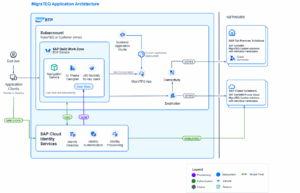
- Front-End: Built with SAP UI5 and FIORI Elements to provide an intuitive and user-focused experience.
- Back-End/Processing: Utilizes ABAP Migration Programs to transform collected data into user master records and to configure necessary user management objects within the respective organization.
- Integration is accomplished via specified data models and reference tables.
The application depends on essential reference tables for validation and assigning roles.
- Organizational Unit Reference Table: Implemented as a list of Company Codes or other organizational levels. It controls access, ensuring data collectors only see and enter data relevant to their assigned scope or segment.
- Job Role Reference Table: Tailored to address specific project requirements. Each job role encompasses a set of access permissions/collection of roles that are automatically granted to users according to their designated job function. This functionality simplifies the assignment of user roles if you have standardized positions in your organization that have the most frequently assigned roles and you are not comfortable using composite roles.
Access to the FIORI application depends on the user roles and groups assigned within the organization.
- Organizational Separation: Data is carefully segmented, such as by company code, so that users and administrators can only access information from their authorized entities.
- Validation Levels and workflow: Multi-level record validation, combined with administrators’ capacity to review and finalize records, offers layered oversight to ensure data accuracy and preparedness for the backend processing.

Implementation and Operations
Deployment Model
- On-Premise/Hybrid on BTP
Application Flow and Process Description
The process functions on two different levels:
- Data Collectors gather user information, including basic details and job responsibilities.
- The collector selects a Job Role, that automatically assigns a specific set of roles.
- Users can choose unlimited additional roles within their organizational unit.
- Validating initial inputs, such as email domain, helps reduce entry mistakes.
- Data is stored as in draft tables. (Drafts are crucial for preventing data loss, locking objects to prevent concurrent editing, and ensuring a consistent user experience even if an application is interrupted.
- Administrators review, correct, and fix the entered data.
- After validation, either the collector or the administrator marks the record as “Final Entry”, locking it for processing and making it view-only.
- Finalized records are exported for backup, review, or assessment.
- Migration programs handle the finalized records and create user master records with roles assignment.
- Successful processing is confirmed through published logs, that can be exported and archived.
Commercialization and Next Steps
- Upon request
MigraTEQ is the perfect solution for companies aiming to streamline user data collection and simplify user migration within complex SAP environments. It greatly reduces errors, increases productivity, and delivers significant time and cost savings in managing authorizations and access rights.

“Ready to simplify your SAP user migration?”
MigraTEQ is now available on SAP Store